Node management
This article refers to Platform v3.3.0. The current Platform version is v3.4.0.
Overview
Barbara Panel lets you remotely manage the lifecycle of every edge node in your organization: register it, activate it, deactivate it, delete it, or wipe it when a physical threat compromises it. Most of these actions live behind the Manage Node button on the Node Details page.
This article walks through every state a node can be in, the command that moves it from one state to the next, and what changes on the node itself.
Edge node lifecycle
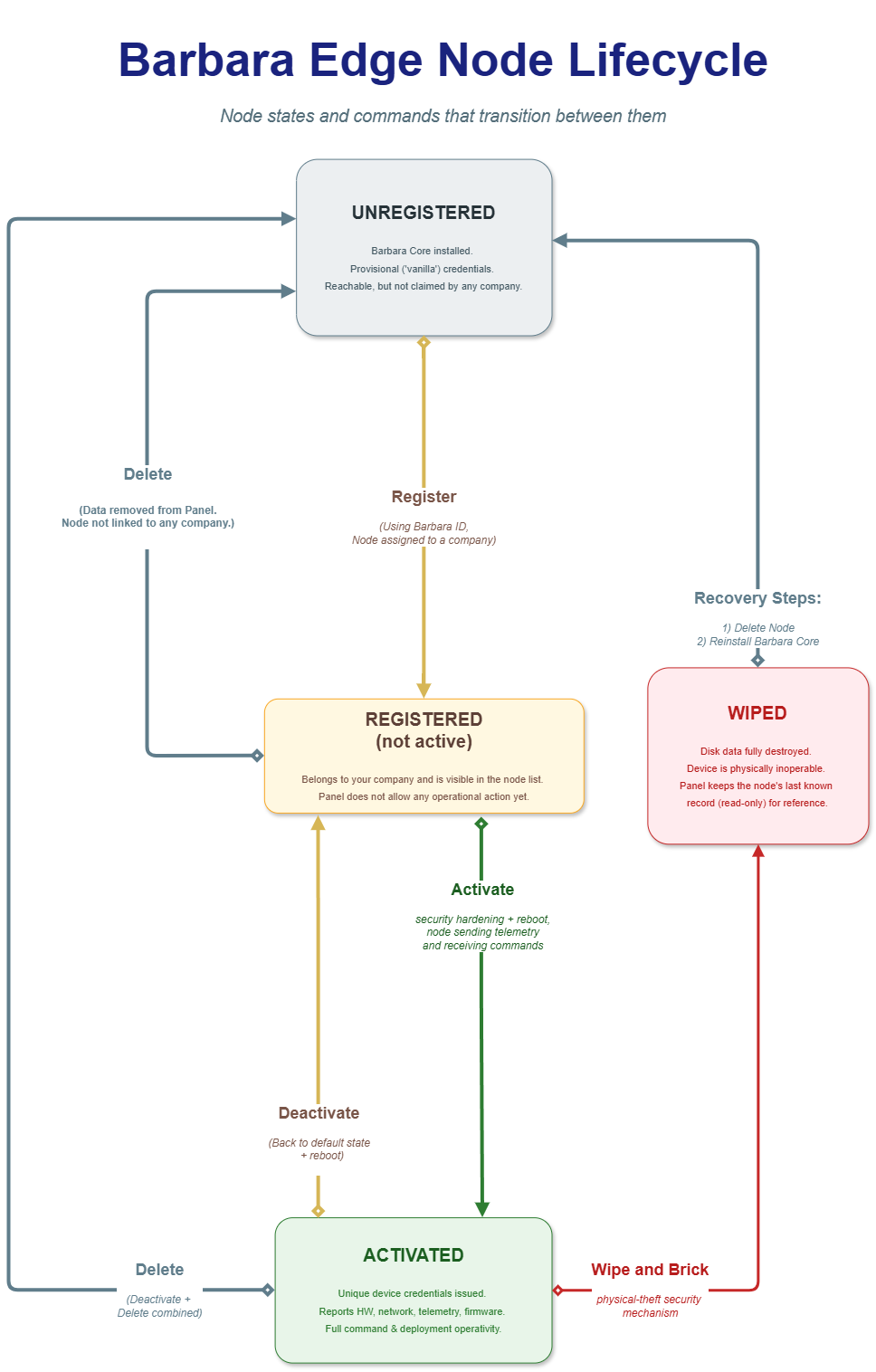
Edge node lifecycle
A node moves through four states:
- Unregistered — Barbara Core is installed and running, using provisional credentials. The node is reachable but not claimed by any company.
- Registered (not active) — the node belongs to your company and is visible in the Nodes List, but Panel does not allow any operational action on it yet.
- Activated — the node has its own unique credentials, sends telemetry, and accepts commands.
- Wiped — the node's disk has been erased and its Barbara Core installation destroyed. The node is physically inoperable; Panel keeps its last known record as a read-only reference.
The Barbara ID that identifies a node is generated by the node itself the first time Barbara Core boots, not chosen by you. See Get the Barbara ID of the node for the ways to retrieve it before registering a node in Panel.
Registering without activating
When you add a node to Panel, the Activate this node automatically (recommended) toggle is on by default, so the node moves straight from Unregistered to Activated. Turning it off leaves the node in Registered (not active) instead.
This is useful when you want nodes claimed by your company and confirmed reachable, without letting anyone operate them yet — for example, a batch of nodes already flashed with Barbara Core and shipped to a warehouse, not yet installed on-site. Once a node reaches its final location and has network access, the only remaining step is Activate: nobody needs to look up its Barbara ID or register it again.
Manage Node side menu
Open the Manage Node side menu from the power-icon button at the top-right of the Node Details page.

Manage Node button
The side menu exposes a different set of actions depending on the node's current state.
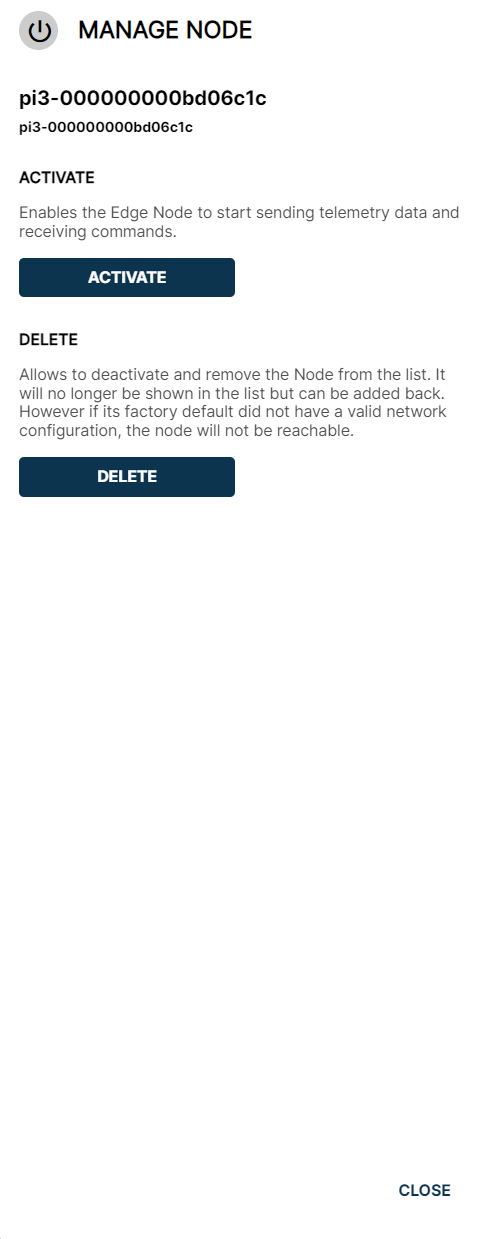
Manage Node options for a node that is not yet active
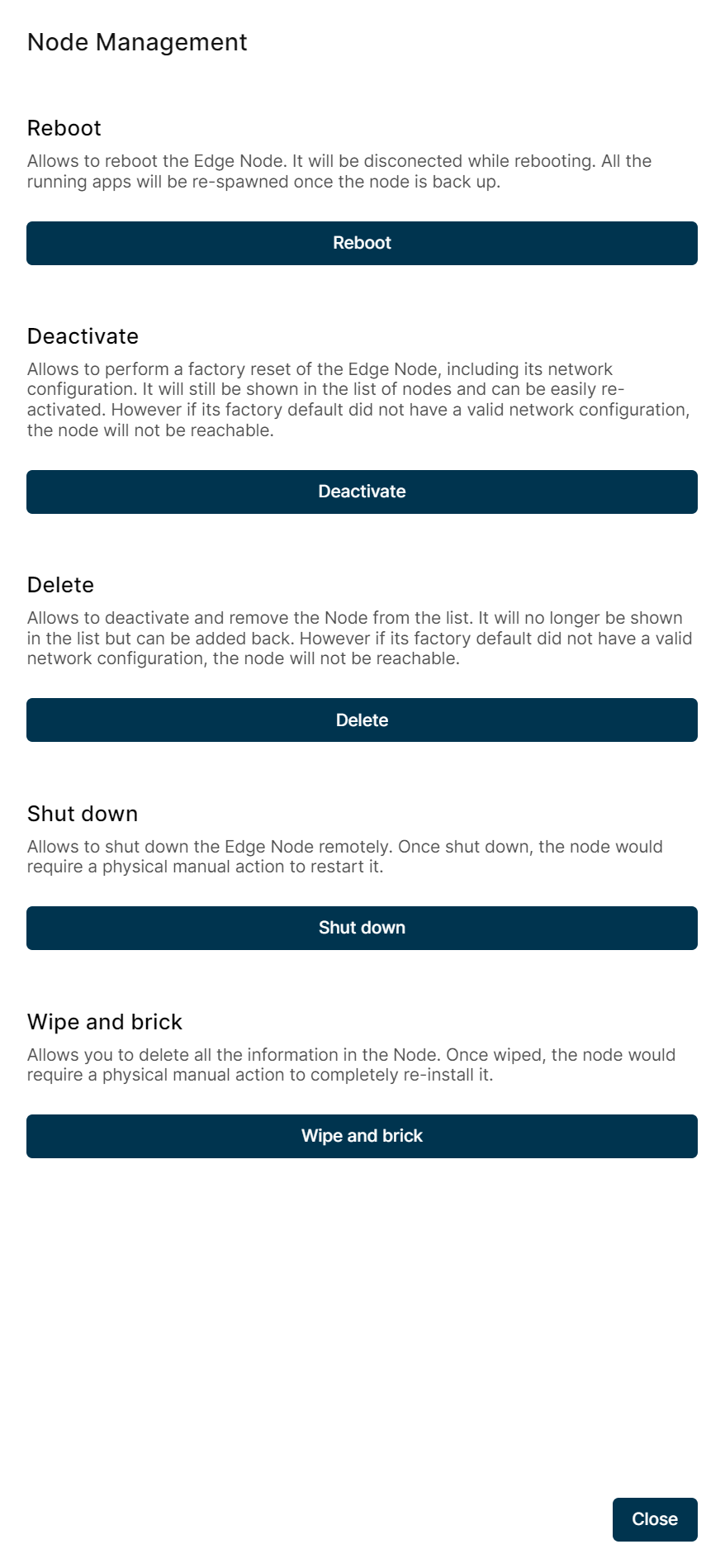
Manage Node options for an activated node
Activate
Available for nodes in the Registered (not active) state. The node applies its unique security credentials and reboots, then starts sending telemetry and accepting commands. This security hardening step is expected to take several minutes — let it finish before assuming something went wrong.
Deactivate
Available for Activated nodes. Performs a factory reset of the node, including its network configuration: all applications, models, and configuration changes made since activation are lost. The node reboots and returns to Registered (not active); it remains in the Nodes List and can be re-activated later, provided its factory default still includes a valid network configuration.
Delete
Removes the node from your company's Nodes List. From an Activated node, Delete deactivates it first and then removes it, so it takes the combined time of both operations. Either way, the node itself returns to the Unregistered state — still running Barbara Core, still reachable, but no longer claimed by any company. It can be added back later by registering its Barbara ID again.
Reboot
Restarts the node. It disconnects briefly while it reboots; running applications respawn automatically once the node is back up. Reboot does not change the node's lifecycle state.
Shut Down
Powers the node off remotely. Does not change the node's lifecycle state.
A node that has been shut down can only be brought back online with a physical manual action on the device.
Wipe & Brick
Available only for Activated nodes. This is an anti-theft mechanism, similar to remotely wiping a stolen phone: if a node is physically stolen or otherwise compromised, Wipe & Brick erases every piece of information on its disk and destroys the Barbara Core installation itself, so nobody with physical access to the node can extract data from it.
The node moves to the Wiped state. Panel can no longer send it commands from the UI; API commands are accepted but never answered, since there is no functioning agent left to receive them. The node's last known record — its configuration, workloads, and history — stays in Panel as a read-only reference.
A node that has been wiped requires a full physical manual re-installation of Barbara Core before it can be used again.
Recovering a wiped node
A Wiped node cannot be reactivated remotely — there is nothing left on it to activate. To bring it back into service:
- Delete the wiped node from Panel.
- Reinstall Barbara Core on the physical device. If it's the same physical unit, it generates the same Barbara ID it had before.
- Register and activate the node in your company, following the same process as a new node.
- Restore any backup you had taken of its previous configuration and workloads.
If the original device never comes back — for example, after a theft — follow the same steps on a replacement device. It generates its own, different Barbara ID, but once registered, activated, and restored from backup, it takes over the role of the node that was lost.
Summary
A Barbara edge node moves through four states: Unregistered, Registered (not active), Activated, and Wiped. Registration and activation can happen together or be split apart, which is useful for staging nodes ahead of deployment. Activation and deactivation apply security hardening to the node's credentials and always require a reboot, while Wipe & Brick is the irreversible, physical-security response reserved for a compromised node. Use the Manage Node side menu to drive a node through this lifecycle from Panel.