Computer Vision with YOLO
This article refers to Platform v3.0.0. The current Platform version is v3.4.0.
Overview
This tutorial walks you through deploying a real-time computer-vision pipeline on a Barbara edge node, end to end. The pipeline runs Ultralytics YOLOv8 against a video stream, overlays detections on a copy of the video, and persists the inference telemetry into InfluxDB so you can chart it in Grafana.
The full data flow:
- The Video Simulator publishes video frames (base64) to the MQTT Broker.
- The Ultralytics YOLOv8 Inference Server subscribes to that stream, runs inference on every frame, and publishes both the annotated video and the telemetry back to the broker.
- The Video Player subscribes to the original or annotated stream and renders it on a web page.
- The MQTT-InfluxDB Ingester writes the inference telemetry into an InfluxDB bucket.
- Grafana visualises the inference metrics from InfluxDB.
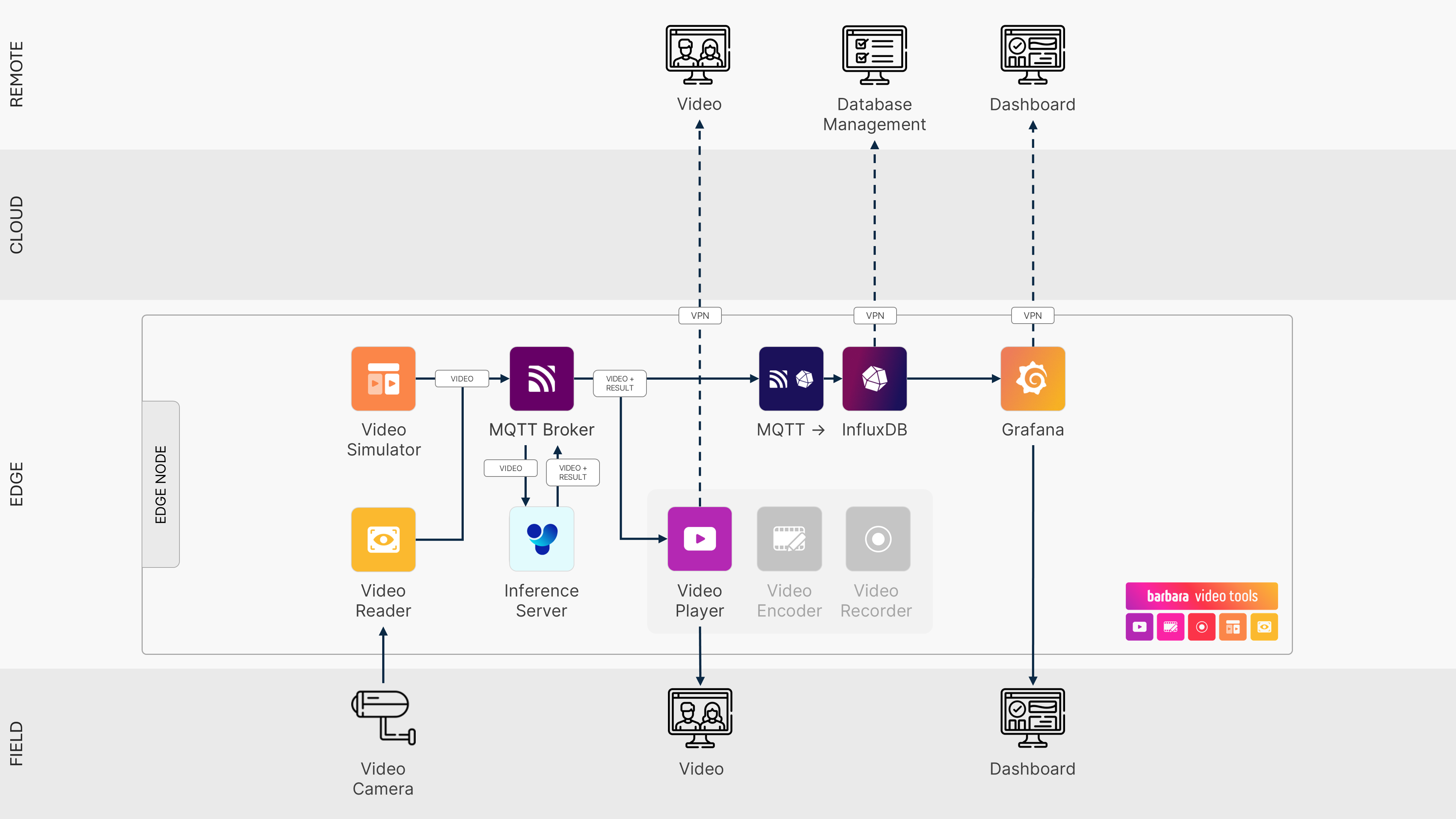
Computer vision solution architecture
This pipeline is resource-intensive. Expect best results on a high-powered edge device (for example, an Advantech C301 or a similar class of hardware) and a GPU for the YOLOv8 inference. The full stack will struggle on a hosted Sandbox node.
Real vs simulated video
This tutorial uses the Video Simulator to publish a video stream — handy because it does not require a real camera. To consume video from real hardware, swap it for the Video Reader app from Barbara Marketplace. The rest of the pipeline is unchanged.
- Video Simulator — simulated source.
- Video Reader — real-camera source.
Prerequisites
Before you start, you need a registered, ACTIVATED edge node in your Barbara Panel — see the Install Barbara Core section if your node is not online yet, and the Node Details reference for the Panel surface you will be using throughout.
Steps
The pipeline is built in seven steps, in this order:
- Deploy the MQTT Broker.
- Deploy the Video Simulator.
- Deploy the Video Player.
- Deploy the Ultralytics YOLOv8 Inference Server.
- Deploy InfluxDB.
- Deploy the MQTT-InfluxDB Ingester.
- Deploy Grafana.
Summary
By the end of the tutorial you will have a working real-time object-detection pipeline running entirely on the edge — frames in, detections out, history visualised — without any cloud component in the loop.