Foundations of Docker
This article refers to Platform v3.1.0. The current Platform version is v3.3.0.
Overview
Docker is a platform that packages applications and their dependencies into lightweight, portable containers that run consistently across development, testing, and production. On Barbara, Docker is the runtime that drives every workload on an edge node — both Marketplace apps and your own apps. This tutorial walks you through the basics of Docker (containers, images, Dockerfiles, Compose) and the specific conventions that apply when you deploy Docker apps to a Barbara node.
Key concepts up front:
- Container — a self-contained runtime instance of an application plus everything it depends on.
- Image — a read-only template a container is built from.
- Dockerfile — the recipe used to build an image.
- Portability — the same image runs identically on any host that runs Docker, which is exactly what edge deployments need.
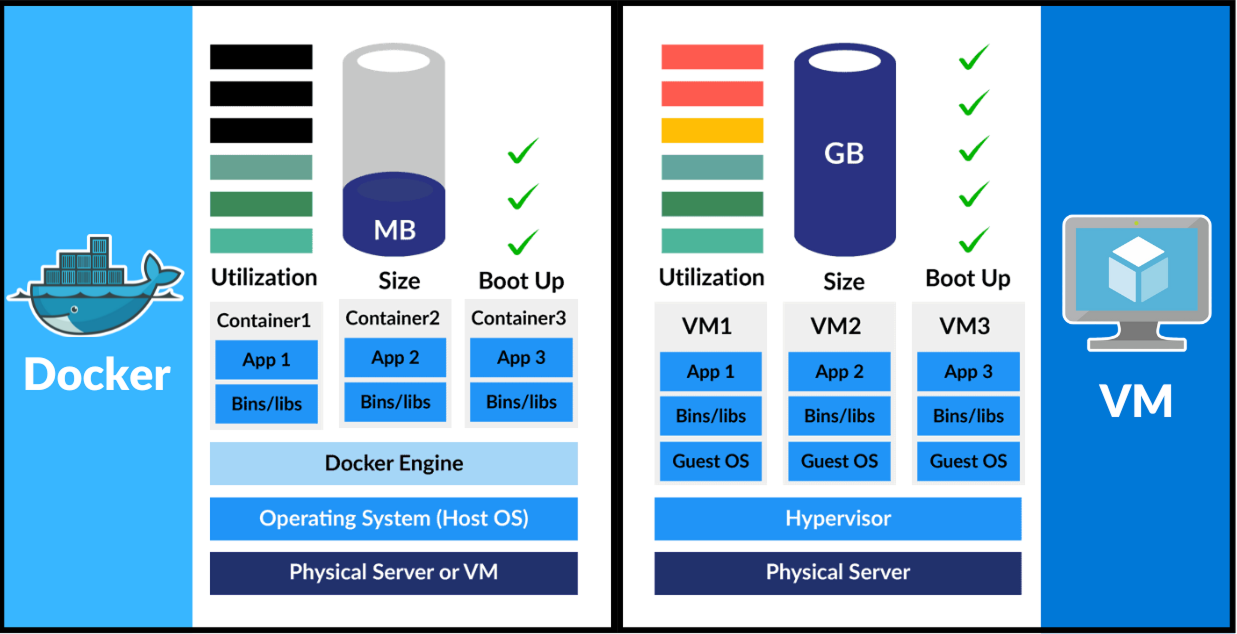
Containers vs virtual machines
Docker vs virtual machines
Where Docker wins:
- Lightweight. Containers share the host kernel; VMs ship a whole OS. Containers start faster and use far less RAM and disk.
- Portable. A container that runs on your laptop will run identically on an edge device — no "works on my machine" mismatch.
- Efficient. Smaller resource footprint per workload than a VM.
- DevOps-friendly. Docker is the de-facto unit of deployment for CI/CD pipelines.
Where Docker is more limited:
- Less isolation. Containers share the host kernel, so they are not a security boundary as strong as a VM.
- Ephemeral by default. Persistent storage needs explicit configuration (volumes, bind mounts).
- Networking. Multi-container networking takes more thought than a flat VM network.
Despite the trade-offs, Docker's speed, scalability, and resource efficiency make it the default choice on Barbara edge nodes.
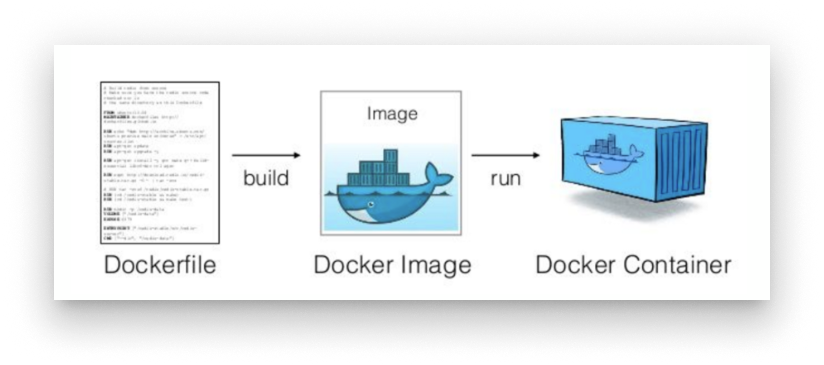
From Dockerfile to container
How Dockerfiles, images, and containers relate
- Dockerfile — a text file with the instructions to build an image (base image, dependencies, files, default command).
- Image — the snapshot produced from a Dockerfile. Immutable. Pushed to registries (Docker Hub, ECR, private registry).
- Container — a running instance of an image.
A common analogy: the Dockerfile is the recipe, the image is the prepared dish, and the container is the dish served.
Why Docker for edge nodes?
Edge nodes are usually resource-constrained machines that need to start quickly and stay running with minimal overhead:
- Lightweight deployment — containers fit IoT gateways and industrial PCs where a VM would not.
- Consistency — what you tested on your laptop will run the same way on the edge.
- Rapid scaling — roll an update out to many nodes in one batch operation.
- Offline-friendly — images can be pre-pulled, so the node keeps running without continuous internet.
- Painless updates — replace the running container with one built from a new image.
Summary
Docker is the runtime under every workload on a Barbara node. The rest of this tutorial walks you through the practical steps — Dockerfiles, Compose, persistence, networking, secrets, and Barbara-specific conventions — needed to package, upload, and operate your own Docker applications on the platform.