Overview
Overview
Dive deep into real-time object detection with Ultralytics YOLOv8. This comprehensive tutorial will guide you through the process of working with video data and analyzing the results.
Object Detection Use Case
In this object detection use case:
- A video stream is captured from a camera (or simulated using the Video Simulator1) and sent to an MQTT broker.
- YOLO, an object detection algorithm, analyzes the video stream frame by frame, identifying and classifying various objects.
- The detected objects and their corresponding information are then sent back to the MQTT broker.
- Then, we can visualize these predictions in real-time using a video player
- Finally, we can review historical data stored in InfluxDB through Grafana.
This is the architecture of the different applications that we will deploy in a Edge Node:
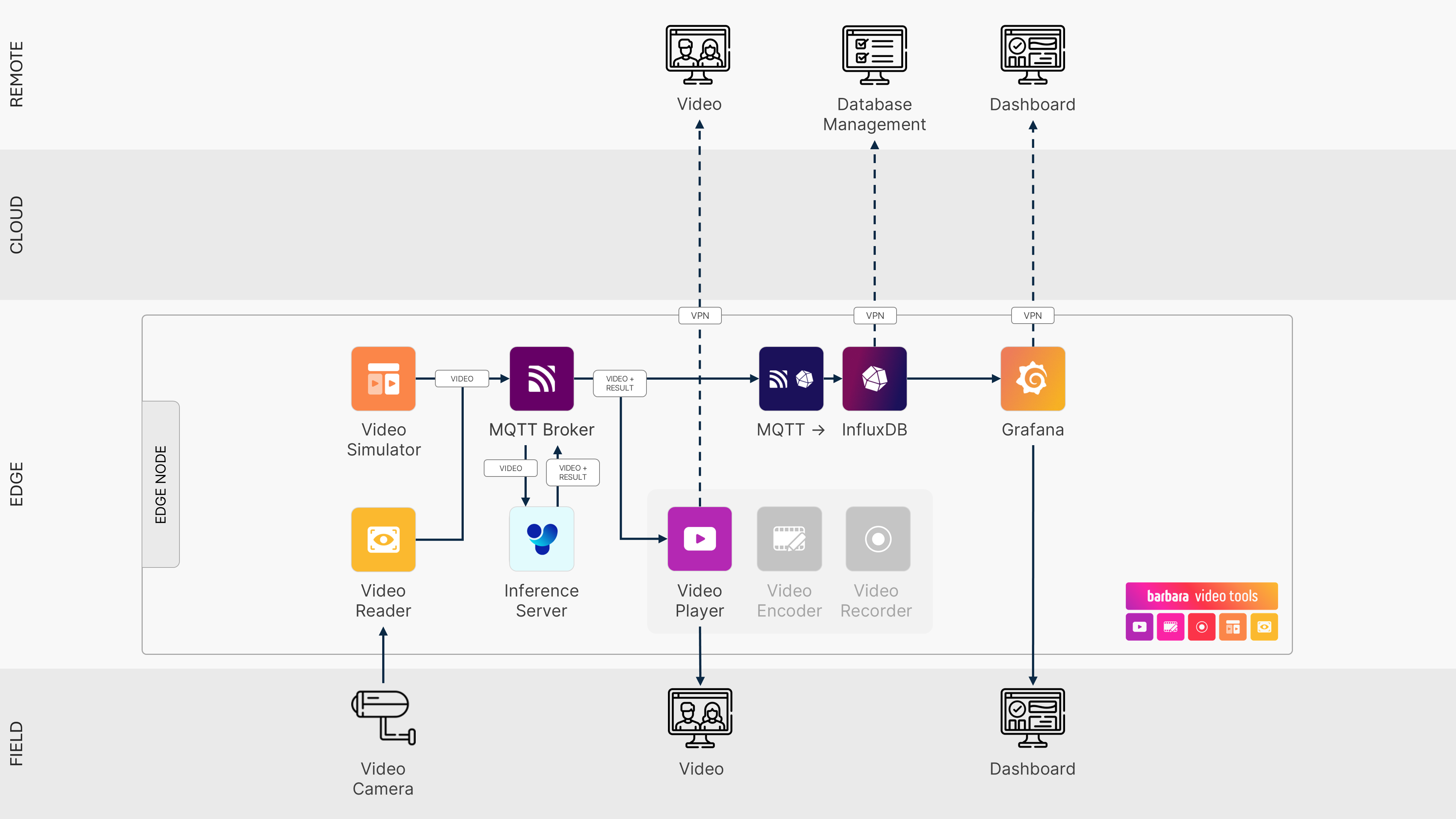
Computer Vision Solution Architecture
Note
The use case described in this tutorial is pretty resource-intensive. You'll get the best results by running it on a high-powered device, like an Advantech C301 or a similar capabilities hardware.