Prerequisites and how the network works
This article refers to Platform v3.3.0. The current Platform version is v3.4.0.
Overview
Before you deploy the pair, you need two edge nodes, a cable between them, and a small addressing plan. This page covers those prerequisites and then explains, in plain terms, how the SoftdPAC controller reaches your network: why it takes its own IP address, when to choose macvlan or ipvlan, what the interlink is for, and why the two clocks must stay in sync.
You don't need to be a Docker or networking expert. You will set a handful of values during deployment, and this page tells you what each one means.
Prerequisites
- Two Barbara Edge Nodes running the same Barbara OS version. High availability keeps the two controllers in lock-step, which requires an identical kernel on both nodes. In this guide the pair is a P6 Edge Large (Node A) and a P6 Edge Small (Node B).
- A dedicated interlink cable connecting one physical interface on each node directly, with no switch in between.
- The SoftdPAC HA application installed on both nodes, one set as primary and the other as secondary.
- A fixed, free IP for each PLC on your LAN. Each controller answers on its own address, so reserve one per node.
Addressing plan
Use this plan throughout the deployment. The two nodes use mirror values.
| Setting | Node A (primary) | Node B (secondary) |
|---|---|---|
| Node | P6 Edge Large | P6 Edge Small |
| Host IP (Barbara OS) | 172.16.50.170 | 172.16.50.187 |
PLC IP (SOFTDPAC_IP) | 172.16.50.22 | 172.16.50.23 |
Partner PLC IP (PARTNER_IP) | 172.16.50.23 | 172.16.50.22 |
Preferred primary (DEVICE_HAPRIO) | yes | no |
Clock role (CHRONY_ROLE) | server | client |
The LAN subnet is 172.16.50.0/24. The gateway and the physical interface names depend on your hardware, so you read them from each node's Network card in Barbara during deployment.
How the network works
How you reach the PLC
The controller is reachable in more than one way, which is what lets it fit both plant and remote-access setups. Its management, OPC-UA and REST ports (51443, 4840, 51499) are available at three addresses:
- Its own LAN IP. Through its device network (
macvlanoripvlan), the PLC joins your LAN as a first-class device and answers onSOFTDPAC_IP, for example172.16.50.22. EAE, your SCADA and your field devices reach it at that address, exactly as they would a hardware PLC. - The node's host IP. The same ports are published on the node's host, so the PLC also answers at
host-IP:51443. This runs over the sharedbarbaraServicesbridge network. - The Barbara VPN. The same ports are reachable at the node's VPN address, and the device certificate is valid for that address, so EAE, the HMI and connectors can reach the PLC remotely even when the node has no public LAN exposure.
Other apps on the same node, such as an OPC-UA connector, reach the PLC over the shared barbaraServices network without going through the LAN at all.
macvlan vs ipvlan
The device network is what gives the PLC its own LAN IP, and it needs a driver, set with DEVICE_MODE. This is the choice that matters most for how field devices and SCADA reach the controller on the plant network:
macvlangives the controller its own MAC address on the LAN, so the switch sees it as a separate physical device. Use it on physical hardware, which is the default and the correct choice for the P6 Edge nodes in this guide.ipvlanshares the host's MAC address and gives the controller an extra IP on it. Use it on virtual machines, or wherever the switch or hypervisor blocks unknown MAC addresses (many virtualization platforms and managed switches do).
The rule of thumb: physical hardware uses macvlan; a VM uses ipvlan. If the PLC IP is unreachable on a VM with macvlan, switching to ipvlan usually fixes it.
The interlink
The two controllers synchronize their state over a dedicated interlink: a cable connected directly between one physical interface on each node, named by INTERLINK_PARENT. This link carries the redundancy synchronization, which is latency-sensitive and must not compete with normal LAN traffic, so it runs on its own cable.
The interlink is always macvlan, regardless of DEVICE_MODE, because each side needs its own MAC for its role. You don't configure any of that: you only name the interface, and the application sets the rest by role.
Keeping the clocks in sync
A redundant pair only works if both nodes agree on the time. The application keeps them aligned automatically so you don't set up time by hand:
- The primary node publishes its time (
CHRONY_ROLE=server) on host UDP port 12399. This port is deliberately off the standard123so it never clashes with the node's own NTP. - The secondary node follows it (
CHRONY_ROLE=client) and pointsCHRONY_PEER_IPat the primary's host IP,172.16.50.170in this plan.
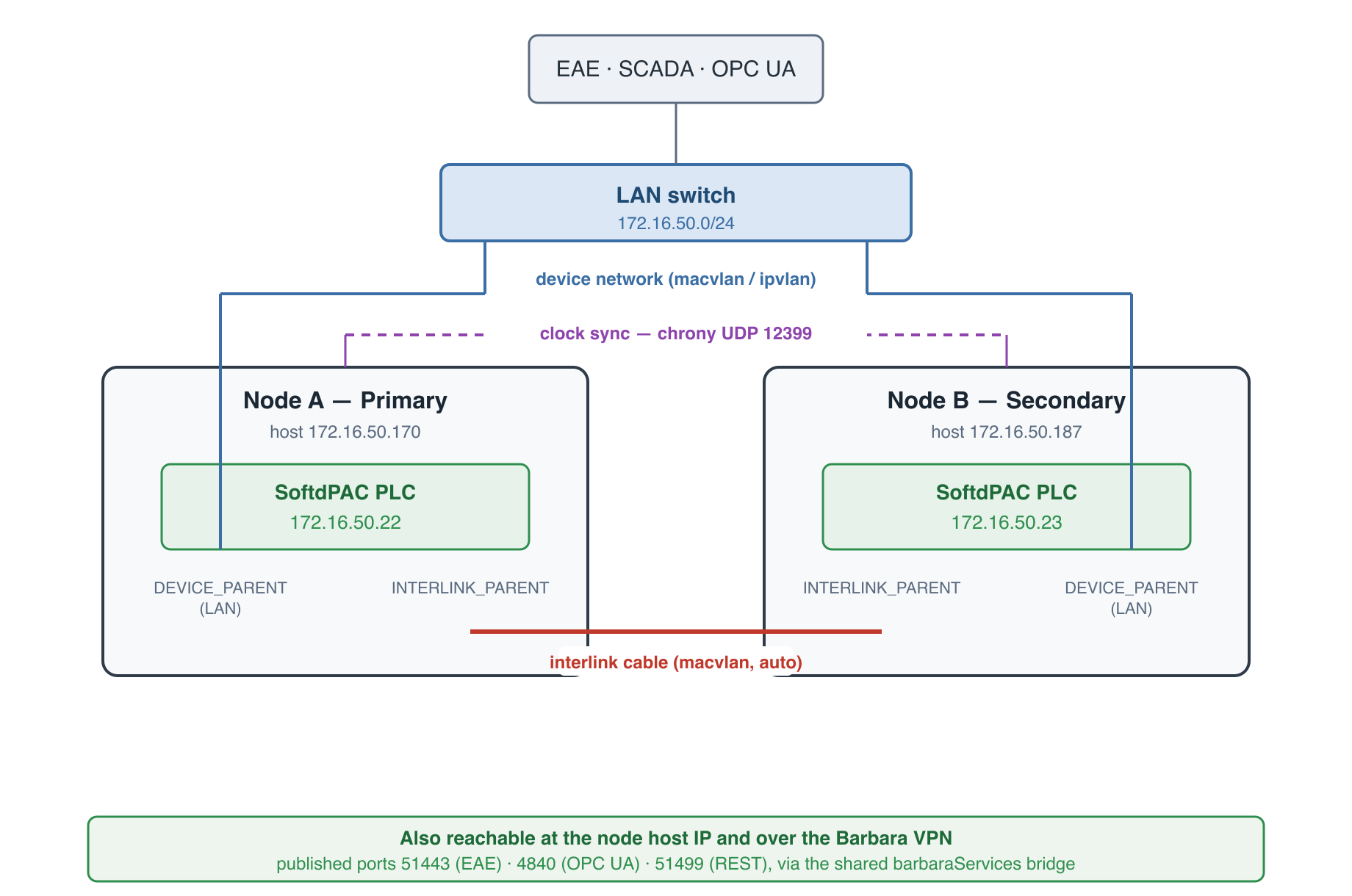
Device network, interlink and clock sync
To find the real interface names for DEVICE_PARENT and INTERLINK_PARENT, and your LAN gateway, open the node's Node Info tab and check its Network card in Barbara. You do this for each node in the next step.
Summary
You now have the pieces in place: two same-kernel nodes, a dedicated interlink cable, an addressing plan, and a clear idea of what DEVICE_MODE, the interlink and the clock sync do. Barbara runs the controller as a first-class device reachable on your LAN, on the node's host IP, or over the Barbara VPN, so the pair behaves like one resilient PLC that your existing tools already know how to reach. Next, you deploy the application on the primary node.
Continue with Deploy the primary node.