1.3 - Modify the Node-RED configuration
This article refers to Platform v3.2.0. The current Platform version is v3.4.0.
Overview
In this step, you will change the configuration of a deployed Node-RED workload. Barbara offers several options for configuring applications, each suited to a different need:
- App Config: Defines application-specific key-value settings, stored in a JSON file. Ideal for runtime-adjustable parameters for a single workload.
- Global Config: Contains key-value pairs shared across multiple applications on the node. Ideal for consistent values reused by several workloads.
- Compose Config: Defines ports and volumes for Marketplace applications. Used to set up how these workloads communicate and persist data.
- App Secrets: Stores application-specific key-value pairs for a single Marketplace application. Used when a workload needs isolated, private secret values (like database credentials).
- Global Secrets: Securely stores key-value pairs shared across all applications on an edge node. Best for sensitive credentials or API keys needed by multiple workloads.
You can explore all the different configuration options here.
For this guide, you will update the username and password, which are part of App Secrets, and adjust the service port, which is part of the Compose Config. Finally, you will verify access to the Node-RED editor using the new settings.
Change Node-RED Configuration
Once an application is running, you can view and modify any of its configurations directly from its workload card. To do so, simply click the pencil icon located next to the configuration type (App Config, App Secrets, or Compose Config). This opens a dialog where you can easily update the current values.
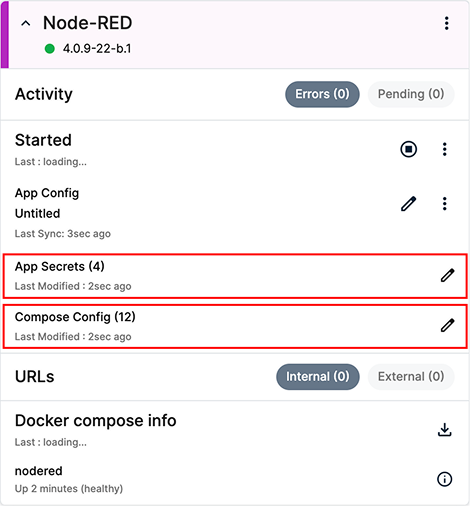
Node-RED workload
1) Update App Secrets (User and Password)
Open the App Secrets dialog by clicking the pencil icon next to it and change the default user and password:
- NODE_RED_USER:
new_bbruser - NODE_RED_PASSWORD:
new_bbrpassword
Click Send to apply the changes.
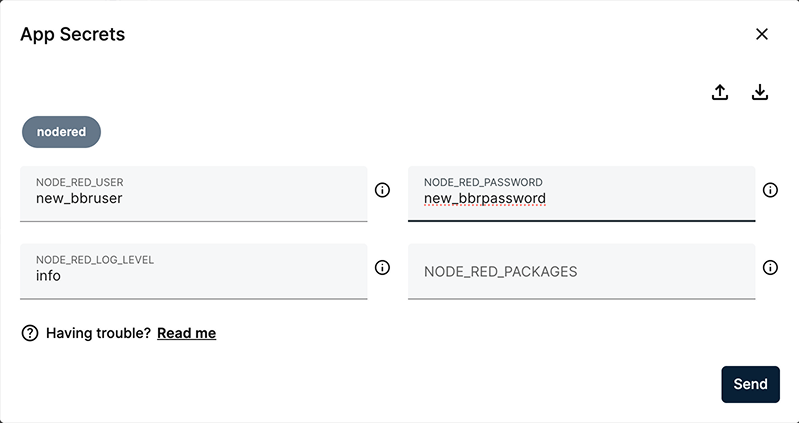
Change the App Secrets configuration
After sending changes in App Secrets, the workload restarts to apply the new values.
2) Update Compose Config (Service Port)
Open the Compose Config dialog by clicking the pencil icon next to it. Then, change the node port:
- NODE_PORT:
1881
Click Send to apply the changes.
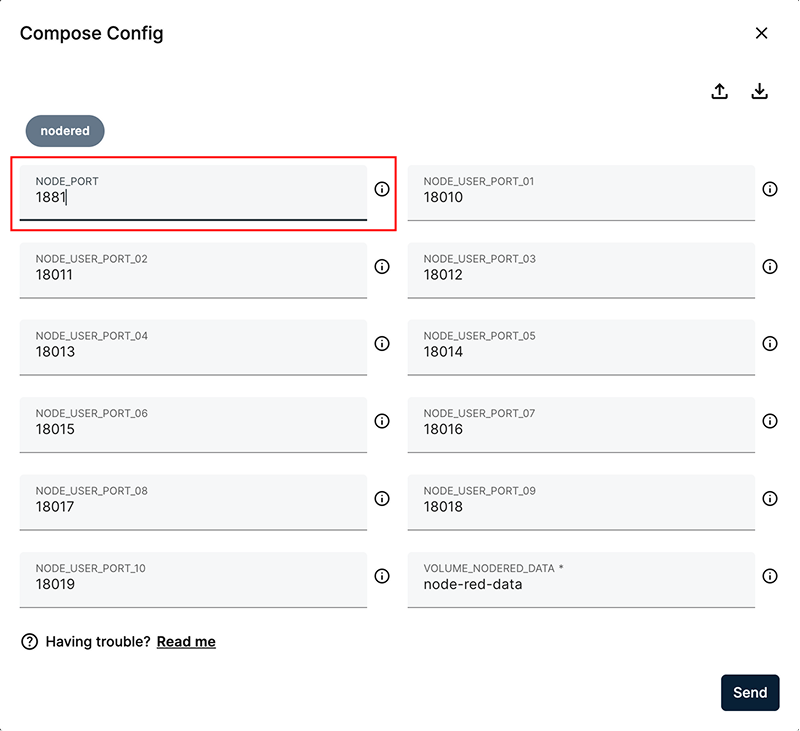
Change the Compose Config
After sending changes in Compose Config, the workload restarts to apply the updated settings.
Verify the Changes
To verify that your changes were applied, you must now access the editor using the new port and credentials:
- Open a new browser tab and navigate to
http://NODE_IP:1881. - At the login screen, enter
new_bbruserandnew_bbrpassword.
If the editor is not immediately reachable, wait a few seconds for the workload to finish restarting and try again.
Summary
You have successfully modified your deployed Node-RED workload by updating its credentials (App Secrets) and service port (Compose Config), and verified access with the new configuration.
In the next step you will deploy other applications and configure them to create your first solution.